Today, developers can add AI-powered chat, document analysis, intelligent search, content generation, code assistance, and business automation to modern applications. But connecting an LLM API to an application is only the beginning.
A production-ready AI application needs a proper architecture.
You need to think about how the application will handle user requests, connect with the LLM, access business data, use external tools, manage conversations, protect sensitive information, control costs, and handle failures.
This guide explains LLM application architecture, its main components, common patterns, and best practices for building reliable AI-powered software.
What Is LLM Application Architecture?
LLM application architecture describes how an application connects an LLM with users, business data, APIs, databases, tools, and other software components.
A simple LLM application may look like this:
User
↓
Frontend
↓
Backend API
↓
LLM
↓
Response
This can work for simple applications such as a basic AI writing assistant.
However, business applications usually need more.
For example, an AI customer support system may need to:
- Understand the user’s question
- Search company documents
- Check customer information
- Call an internal API
- Generate an answer
- Follow user permissions
- Store conversation history
- Monitor usage
The architecture therefore becomes more like:
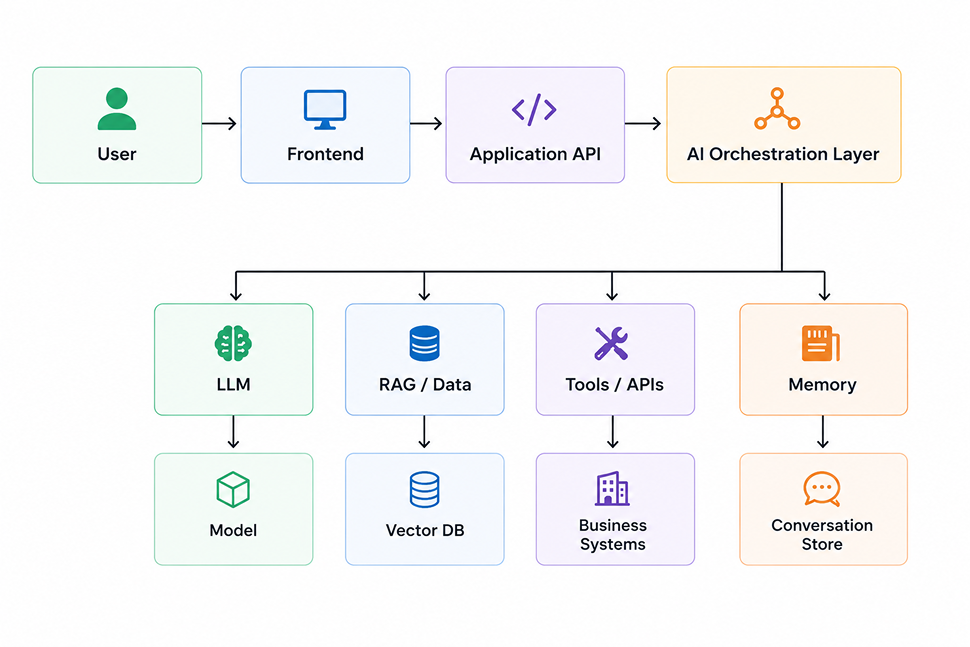
The exact architecture depends on the application’s requirements.
Main Components of an LLM Application
A modern LLM application usually contains several layers.
1. User Interface
The frontend is where users interact with the AI application.
It could be:
- Web application
- Mobile application
- Desktop application
- Internal company portal
- Customer support interface
- Voice interface
The frontend should generally communicate with your backend rather than directly calling the LLM provider.
This gives you more control over authentication, security, prompts, data access, and usage limits.
2. Backend Application
The backend is responsible for handling application logic.
It can be built using technologies such as:
- .NET
- Node.js
- Python
- Java
- Go
The backend can manage:
- Authentication
- User permissions
- API requests
- Business rules
- Database operations
- AI requests
- Logging
- Rate limiting
For example, an ASP.NET Core application can receive a user’s request and decide whether it needs to call an LLM, search a knowledge base, or use a business API.
3. AI Orchestration Layer
The orchestration layer is one of the most important parts of a production LLM application.
Instead of sending every request directly to the model, this layer controls how the AI works.
It can manage:
- Prompt construction
- Model selection
- Conversation history
- RAG
- Tool calling
- Function calling
- Response validation
- Safety checks
- Retry logic
- AI workflows
For a simple application, this layer can be part of the backend.
For larger systems, it can be separated into its own service.
4. LLM
The LLM is responsible for processing language and generating responses.
An application may use an external model through an API or a self-hosted model, depending on its requirements.
The model can be used for tasks such as:
- Question answering
- Summarization
- Classification
- Content generation
- Information extraction
- Reasoning
- Conversational AI
The application should not assume that the LLM knows everything about the business.
That is where data integration becomes important.
5. Retrieval-Augmented Generation
Many business applications need AI to answer questions using company-specific information.
RAG, or Retrieval-Augmented Generation, is a common way to solve this problem.
Instead of asking the LLM to answer from its existing knowledge, the application first retrieves relevant information.
The process looks like:
User Question
↓
Create Query / Embedding
↓
Search Knowledge Base
↓
Retrieve Relevant Information
↓
Send Context to LLM
↓
Generate Answer
For example, imagine a company has thousands of product documents.
A user asks:
“What is the warranty period for Product X?”
The system can search the product documentation, retrieve the relevant section, and provide it to the LLM.
The model can then generate an answer based on that information.
6. Vector Database
RAG systems often use vector databases to find information based on meaning rather than exact keywords.
Common vector database options include:
- Pinecone
- Weaviate
- Qdrant
- Milvus
- PostgreSQL with vector capabilities
- Azure AI Search
The process usually involves converting documents into embeddings.
For example:
Document
↓
Text Chunks
↓
Embeddings
↓
Vector Database
When a user asks a question, the application creates an embedding for the query and searches for similar content.
This allows the system to find relevant information even when the user’s wording is different from the wording in the original document.
7. Application Data
Most enterprise AI applications need access to existing business data.
This may include:
- Customer records
- Orders
- Products
- Invoices
- Employee information
- Support tickets
- Reports
The AI should not normally have unrestricted access to the database.
Instead, the application should control access through APIs and business logic.
For example:
AI Agent
↓
Business API
↓
Authorization
↓
Business Logic
↓
Database
This approach provides better security and makes it easier to enforce business rules.
8. Tools and Function Calling
LLMs can generate text, but many useful AI applications need to perform actions.
This is where tools and function calling become useful.
For example, an AI assistant could have tools such as:
get_customer()
check_order_status()
create_support_ticket()
schedule_meeting()
generate_invoice()
The model decides when a tool may be useful, but the application should control whether the requested action is actually allowed.
For example:
User
↓
AI Agent
↓
Tool Request
↓
.NET / Backend API
↓
Authorization Check
↓
Business Logic
↓
Database
This is much safer than giving an AI model direct database access.
9. Conversation Memory
Chat applications often need to remember previous messages.
There are different types of memory.
Short-Term Memory
This includes the current conversation.
For example:
User: Find my order.
AI: Which order?
User: The one I placed yesterday.
The application needs the earlier messages to understand what “the one” refers to.
Long-Term Memory
Some applications may need to remember information between conversations.
For example:
- User preferences
- Frequently used settings
- Previous interactions
- Saved information
Long-term memory should be designed carefully because storing unnecessary personal or sensitive information creates security and privacy risks.
10. API Gateway and Authentication
Security should be part of the architecture from the beginning.
An AI application may use:
- API gateways
- OAuth
- JWT authentication
- Role-based access control
- Rate limiting
- Network restrictions
- Secret management
For example:
User
↓
Authentication
↓
API Gateway
↓
Application API
↓
AI Layer
This prevents unauthorized users from directly accessing AI services or internal tools.
A Practical LLM Architecture
A production AI application can combine all these components.
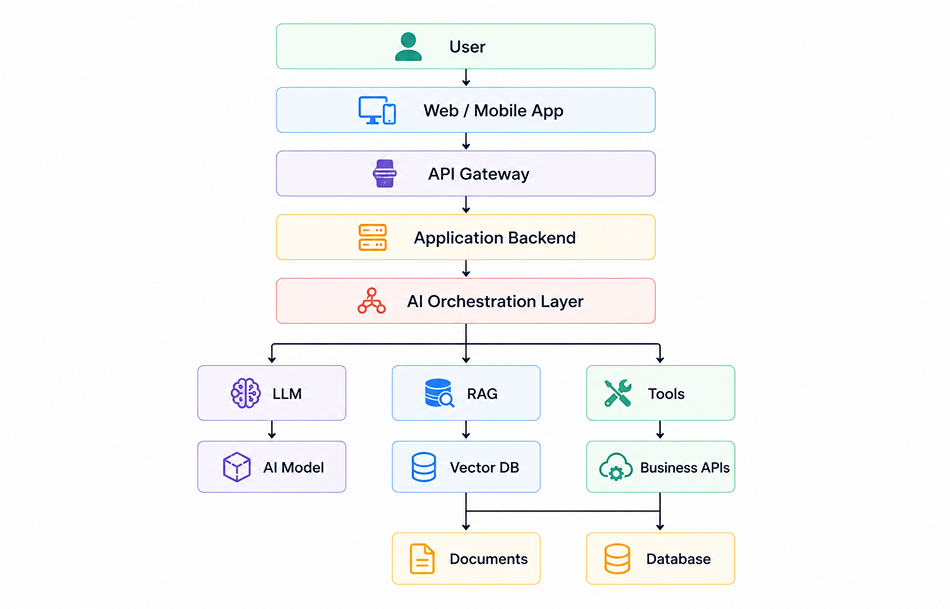
Additional components can be added for:
- Caching
- Monitoring
- Logging
- Queues
- Security
- Analytics
The important thing is not to add every component just because it is available.
Start with what your application actually needs.
LLM Application Architecture Patterns
Different applications need different architecture patterns.
Pattern 1: Simple LLM Application
This is the easiest architecture.
Frontend
↓
Backend
↓
LLM API
Good for:
- Writing assistants
- Summarization tools
- Simple chat applications
- Text classification
This is a good starting point when the application doesn’t need external data or tools.
Pattern 2: LLM + RAG
User
↓
Backend
↓
Retriever → Vector Database
↓
LLM
↓
Response
Good for:
- Knowledge bases
- Internal assistants
- Document search
- Customer support
- Technical documentation
Pattern 3: LLM + Tools
User
↓
AI Orchestrator
↓
LLM
↓
Tools / APIs
↓
Business Systems
Good for:
- AI assistants
- Business automation
- CRM assistants
- Order management
- Workflow automation
Pattern 4: Agent-Based Architecture
An AI agent can combine reasoning, memory, tools, and data retrieval.
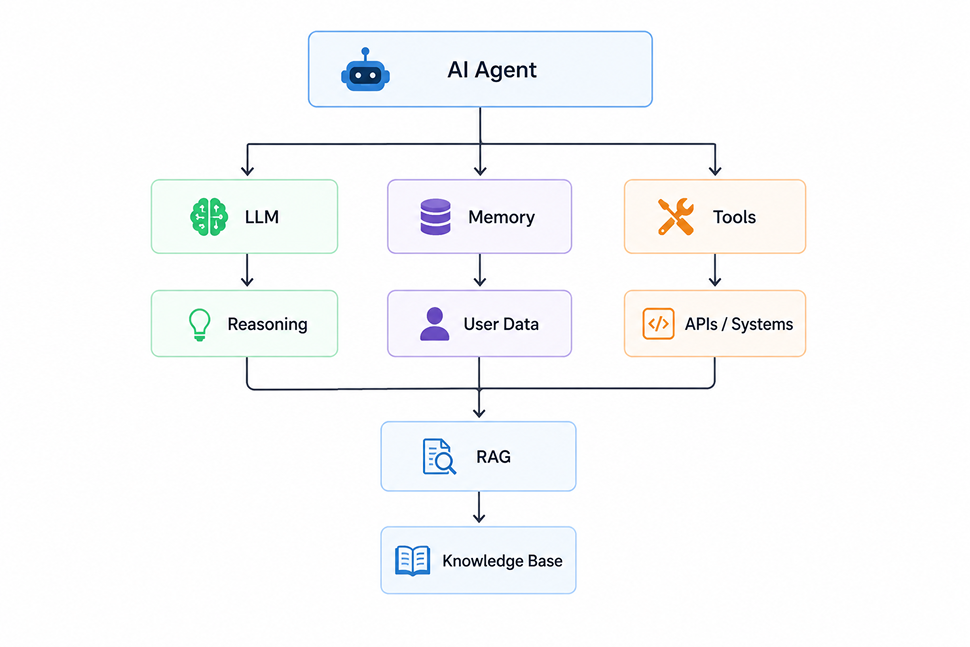
Agent-based systems can be powerful, but they are also more complex.
They require stronger controls around permissions, monitoring, cost, and reliability.
How to Choose the Right LLM Architecture
Don’t start by choosing a framework.
Start with the business problem.
Ask:
Does the AI need company-specific information?
If yes, consider RAG or another controlled data retrieval approach.
Does the AI need to perform actions?
If yes, consider tools or function calling.
Does the application need conversation history?
If yes, design a memory strategy.
Does the AI handle sensitive data?
If yes, prioritize security, access controls, data handling, and deployment requirements.
Does the application need to support thousands of users?
If yes, consider scalability, caching, queues, rate limits, model selection, and cost controls.
Best Practices for Building LLM Applications
1. Start Simple
Don’t build a multi-agent system when a basic LLM API can solve the problem.
Start with the simplest architecture that meets the requirement.
2. Keep Business Logic Outside the LLM
The LLM should help interpret requests and generate responses.
Important business rules should remain inside your application.
For example, don’t ask the AI to decide whether a refund is allowed.
Let your backend enforce the refund policy.
3. Limit Data Access
Only provide the model with the information required for the task.
This improves security and can also reduce AI costs.
4. Validate AI Output
Never assume an AI response is always correct.
For structured operations, use schemas and validation before processing the response.
5. Monitor Costs
Every AI request can have a cost.
Track:
- Token usage
- Model usage
- Number of requests
- Response length
- API failures
Use the right model for each task instead of automatically using the most powerful model.
6. Add Observability
Monitor the complete AI workflow.
You should know:
- Which model was used
- How long the request took
- How much it cost
- Whether retrieval worked
- Whether a tool failed
- Whether the final response was successful
7. Plan for Failures
AI APIs can fail.
Your application should handle:
- Timeouts
- Rate limits
- Network errors
- Model errors
- Invalid responses
Use appropriate retry and fallback strategies.
8. Protect Against Prompt Injection
User input and retrieved documents should be treated as untrusted content.
Do not allow instructions inside external documents to automatically override system rules.
Tool permissions should also be enforced by the application rather than relying only on the model.
LLM Application Architecture for .NET
For organizations already using .NET, an AI architecture can fit naturally into the existing technology stack.
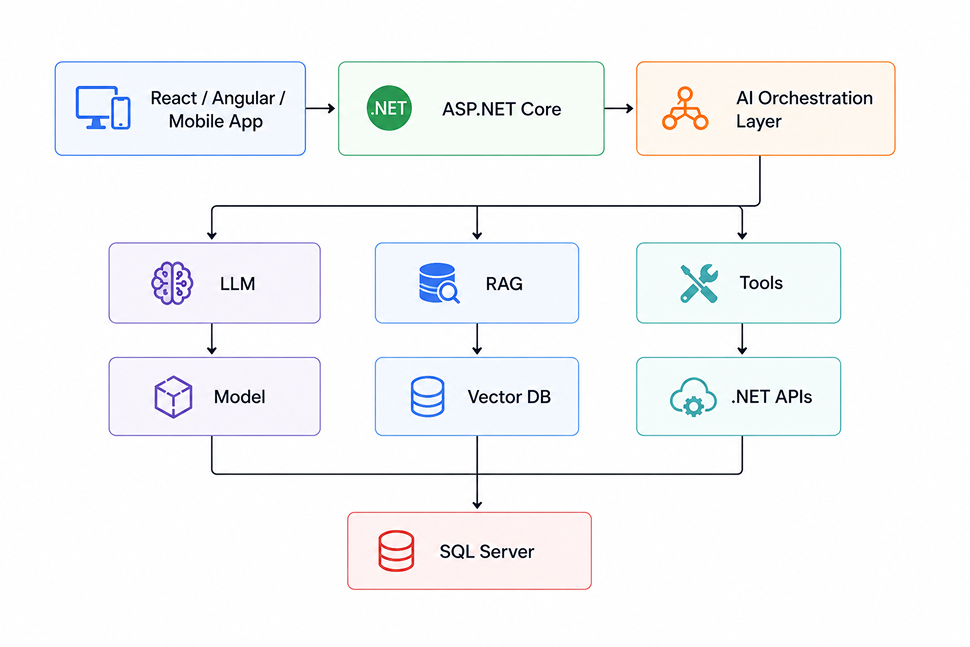
ASP.NET Core can manage authentication, APIs, business rules, and application services, while the AI layer handles model interactions, retrieval, and tool orchestration.
This approach allows businesses to add AI without completely replacing their existing software.
Common Mistakes to Avoid
Building an LLM application can become complicated quickly.
Some common mistakes include:
Giving the AI direct database access: This creates unnecessary security risks.
Using RAG when it isn’t needed: Not every AI application requires a vector database.
Building agents too early: Start with a simple workflow before moving to autonomous agents.
Ignoring AI costs: A system that works for 100 users may become expensive at 100,000 users.
Skipping evaluation: AI output needs regular testing and evaluation.
Putting business rules inside prompts: Prompts can guide an AI model, but they shouldn’t replace application logic.
Ignoring latency: Users may abandon an application if every AI request takes too long.
Final Thoughts
A good LLM application is more than an LLM connected to an API.
The model is only one part of the system.
A reliable AI application needs the right combination of backend services, data access, RAG, tools, memory, security, monitoring, and business logic.
The best architecture depends on what the application needs to accomplish.
For a simple writing assistant, a direct LLM API may be enough. For an enterprise knowledge assistant, you may need RAG and a vector database. For an AI-powered business assistant, you may also need tools, APIs, authentication, and strict permission controls.
The best approach is to start small, validate the use case, and add complexity only when it provides real value.
When designed properly, LLM application architecture can help businesses build AI-powered software that is not only impressive in a demo but also secure, scalable, maintainable, and useful in the real world.