AI is no longer something businesses need to build from scratch.Many companies already have .NET applications that handle their customers, employees, orders, documents, payments, or internal processes. The challenge is figuring out how to add AI to those existing applications without rebuilding everything.
This is where AI integration with .NET becomes useful.
With the right architecture, APIs, and development approach, you can add features such as AI chatbots, document analysis, recommendations, intelligent search, content generation, and AI assistants to an existing .NET application.
In this guide, we will look at how AI integration works with .NET applications, the architecture you can use, important APIs, and best practices for building a reliable AI-powered application.
What Is AI Integration With .NET?
AI integration means connecting AI models and services with an existing .NET application so the application can use AI capabilities.
A typical .NET application may already contain:
- ASP.NET Core APIs
- Business logic
- SQL or NoSQL databases
- Authentication
- Web or mobile interfaces
- Third-party APIs
- Cloud infrastructure
Instead of replacing these components, AI can be added as another layer or service.
For example, imagine a customer support application built with ASP.NET Core.
The existing application already stores customer information and support tickets. An AI layer can be added to:
- Understand customer questions
- Search previous support tickets
- Generate suggested replies
- Summarize conversations
- Find relevant knowledge-base articles
- Escalate complex issues to employees
The .NET application remains the main system, while AI adds new capabilities.
Why Use .NET for AI Applications?
.NET is already widely used for enterprise software, making it a practical choice for adding AI to existing business applications.
One major advantage is that developers don’t need to completely change their technology stack.
.NET applications can connect with AI models through APIs and SDKs, while existing databases, authentication systems, business logic, and cloud services can continue to work.
Some common technologies used in a .NET AI solution include:
- ASP.NET Core
- C#
- REST APIs
- Azure services
- OpenAI-compatible APIs
- Vector databases
- SQL Server
- Cloud storage
- Background services
- Authentication and authorization systems
This makes .NET particularly useful when a company wants to introduce AI into an existing enterprise application.
A Basic Architecture for AI Integration
A simple AI-enabled .NET application can follow this architecture:
User → .NET Application → AI Service → Data/Tools → Response
For example:
- A user sends a question through a web application.
- The ASP.NET Core API receives the request.
- The application checks authentication and permissions.
- The AI service processes the request.
- If required, the system retrieves information from a database or knowledge base.
- The AI model generates a response.
- The .NET application sends the response back to the user.
A more advanced architecture can look like this:
Frontend → ASP.NET Core API → AI Orchestration Layer → LLM → RAG / APIs / Database → Response
The important point is that the AI model should not automatically have direct access to everything in your application.
The .NET application should control what data the AI can access and what actions it can perform.
Common Ways to Integrate AI Into .NET
There isn’t one single method for AI integration. The right approach depends on what you want the application to do.
1. AI Through REST APIs
The simplest approach is connecting your .NET application to an AI provider through an API.
Your application sends a request containing information or a prompt, and the AI service returns a response.
For example:
.NET Application → AI API → AI Model → Response → .NET Application
This approach works well for:
- Text generation
- Summarization
- Classification
- Translation
- Chatbots
- Content analysis
It is also relatively easy to add to an existing application.
2. Using AI SDKs
Instead of manually handling every API request, developers can use available SDKs and .NET libraries.
SDKs can simplify tasks such as:
- Authentication
- Sending model requests
- Handling responses
- Streaming output
- Tool calling
- Managing conversations
This can make the code easier to maintain as the AI functionality becomes more advanced.
3. Retrieval-Augmented Generation (RAG)
RAG is useful when your AI application needs to answer questions using your company’s data.
For example, suppose you have an internal HR application containing hundreds of company policies.
Instead of asking an AI model to answer from general knowledge, the application can:
- Receive the employee’s question.
- Search the company’s documents.
- Find relevant information.
- Send that information to the AI model.
- Generate an answer based on the retrieved content.
The flow looks like:
User Question → Search → Relevant Documents → AI Model → Answer
RAG can be used for:
- Internal knowledge assistants
- Customer support
- Technical documentation
- Legal document search
- Product information
- Employee portals
Using APIs and Tools With AI Agents
Modern AI applications can do more than generate text.
An AI agent can use tools and APIs to perform actions.
For example, an AI assistant inside a CRM application could:
- Search customer records
- Create a support ticket
- Check an order status
- Schedule an appointment
- Generate a report
- Update information after approval
The AI should not directly control these systems.
Instead, the .NET application can expose controlled functions or APIs.
For example:
AI Agent → .NET Tool/API → Business Logic → Database
This gives developers better control over what the AI is allowed to do.
Important APIs for .NET AI Applications
Depending on the project, a .NET AI application may work with several types of APIs.
AI Model APIs
These APIs provide access to language and other AI models.
They can be used for:
- Text generation
- Reasoning
- Summarization
- Classification
- Embeddings
- Multimodal processing
Business APIs
These are your application’s existing APIs.
For example:
GET /api/customers
GET /api/orders
POST /api/tickets
GET /api/invoices
AI can use these APIs when it needs business information or needs to perform an approved action.
Database APIs
Your application may also need access to databases such as SQL Server or other data stores.
However, it is generally better to keep database access behind the application’s business logic rather than allowing an AI model to directly query the database.
AI Integration Architecture for Enterprise Applications
For larger applications, you may want to separate AI functionality from the main application.
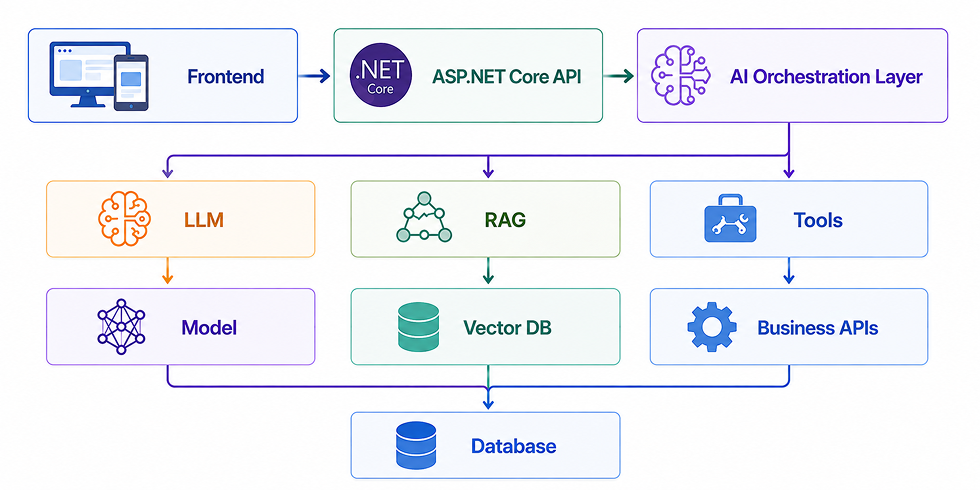
This separation makes the system easier to maintain and scale.
The orchestration layer can manage:
- Prompts
- Conversation history
- Model selection
- RAG
- Tool calling
- Permissions
- Error handling
- Logging
- AI response validation
Best Practices for AI Integration With .NET
Adding an AI API to a .NET application may be easy.
Building a reliable production system is a different challenge.
Here are some practices worth following.
1. Keep AI Behind Your Application Layer
Don’t expose AI provider credentials or sensitive business logic directly to the frontend.
The frontend should communicate with your backend.
The backend communicates with the AI service.
This provides better control over security, authentication, logging, and data access.
2. Protect API Keys
Never hard-code AI API keys into your source code.
Use secure configuration and secret management systems.
For cloud applications, services such as Azure Key Vault can help manage sensitive credentials.
3. Control What Data AI Can Access
An AI system should only receive the information it actually needs.
If a customer asks about their order, there is no reason to send unrelated customer records to the model.
Apply the same permissions that exist in your application.
4. Don’t Trust Every AI Response
AI models can produce incorrect or incomplete information.
For important workflows, validate the response before taking action.
For example, if an AI assistant recommends cancelling an order, the application should still check:
- Does the order exist?
- Is cancellation allowed?
- Is the user authorized?
- Has the order already shipped?
The business rules should remain in your application.
5. Manage AI Costs
AI usage can become expensive when applications start handling thousands of requests.
Track:
- Number of requests
- Input tokens
- Output tokens
- Model usage
- Response time
- Failed requests
Use smaller or cheaper models for simple tasks and reserve more capable models for tasks that actually need them.
6. Add Logging and Monitoring
AI applications need monitoring just like traditional applications.
Track useful information such as:
- Request failures
- API latency
- Model response time
- Token usage
- Error rates
- Tool failures
- User feedback
Avoid logging sensitive user information unnecessarily.
7. Design for Failure
AI services can experience:
- Timeouts
- Rate limits
- API errors
- Invalid responses
- Service outages
Your .NET application should handle these situations gracefully.
Consider:
- Retry policies
- Timeouts
- Fallback responses
- Rate limiting
- Circuit breakers
- Background processing
The application should not completely fail just because an AI service is temporarily unavailable.
Security Considerations
Security becomes even more important when AI is connected to business systems.
Important areas include:
Authentication: Verify who is making the request.
Authorization: Make sure users can only access information they are allowed to see.
Data protection: Avoid sending unnecessary confidential information to external AI services.
Prompt injection protection: Treat instructions coming from documents and user input as untrusted data.
Output validation: Validate AI-generated content before using it in important business operations.
Audit logs: Keep track of important AI-driven actions.
For applications handling sensitive business information, security should be considered during architecture design rather than added at the end.
Testing AI Features in .NET Applications
Traditional software testing is not enough for AI-powered applications.
You should test both the application and the AI behavior.
For example, test:
- Normal questions
- Incorrect questions
- Unexpected input
- Long conversations
- Missing data
- Unauthorized requests
- Prompt injection attempts
- API failures
- Hallucinated answers
- Slow responses
For important AI features, create a test dataset with expected outcomes and regularly evaluate the system against it.
When Should You Use RAG, Fine-Tuning, or a Simple API?
One of the most common mistakes is choosing a complex AI architecture when a simple solution would work.
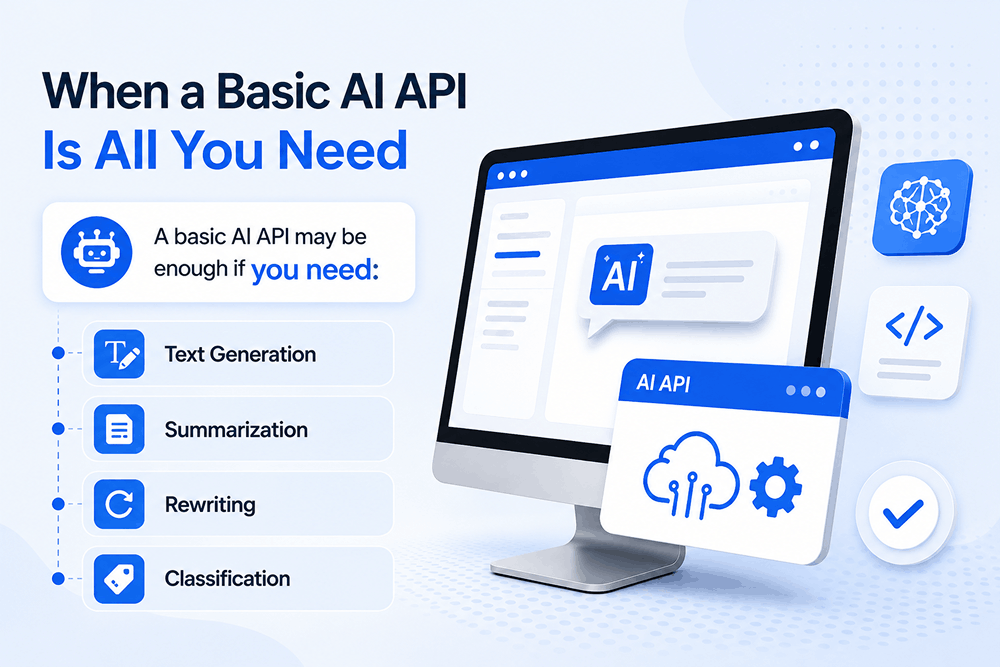
A basic AI API may be enough if you need:
- Text generation
- Summarization
- Rewriting
- Classification
Use RAG when the AI needs to work with your company’s changing documents or knowledge.
Consider fine-tuning when you have a specific behavior or task that requires model adaptation and you have enough suitable training data.
In many business applications, starting with a simple API or RAG solution is more practical than immediately building a complex AI system.
Final Thoughts
AI integration doesn’t mean replacing your existing .NET application.
In most cases, the better approach is to build AI capabilities around the systems you already have.
ASP.NET Core can handle your application’s business logic, authentication, APIs, and data access, while AI services can add capabilities such as intelligent search, document processing, chat, recommendations, and AI agents.
The key is to design the integration carefully.
Start with a clear business problem, choose the simplest architecture that can solve it, protect your data, control AI access to business systems, and monitor the application once it goes into production.
When these principles are followed, .NET can provide a strong foundation for building practical, secure, and scalable AI-powered applications.