There was a time when a marketing team could get by with a website, Google Analytics, an email platform and a spreadsheet.
That is harder to imagine now.
A typical marketing team may be working with website analytics, SEO software, social media platforms, advertising accounts, CRM data, email campaigns, design tools and AI assistants at the same time. The number of available tools has grown quickly, but that does not necessarily make marketing easier.
In fact, choosing the wrong tools can create another problem.
You end up paying for five platforms that do roughly the same thing, moving information between different dashboards and spending more time looking at reports than actually improving campaigns.
So, instead of creating another huge list of every marketing tool available, this guide focuses on the tools that can have a practical role in a modern marketing workflow in 2026.
What Should You Look for in a Marketing Tool?
Start with the problem, not the software.
If your website gets traffic but very few enquiries, you may need better conversion tracking or user behaviour data. If your organic traffic is falling, an SEO platform can help identify where the problem is. If leads are coming in but sales cannot keep track of them, the issue may be your CRM rather than your advertising.
A useful marketing tool should help answer a question, save meaningful time or improve a measurable part of the customer journey.
That is a better reason to buy software than simply because another marketer recommended it.
1. Google Analytics 4 for Understanding Website Traffic
Google Analytics 4 is still one of the basic tools most businesses should have installed.
The useful part is not the number of visitors your website receives. It is what those visitors do after they arrive.
You can look at traffic sources, landing pages, user journeys, conversions and other events to understand which parts of your marketing are actually contributing to business goals.
For example, suppose a company receives 10,000 monthly visitors from organic search but only a small number of enquiries. That tells you something important. The problem may not be traffic at all. It could be the pages attracting visitors, the search intent behind those visits, or the way the website asks users to take the next step.
GA4 helps you investigate those questions.
Google is also adding more AI-assisted capabilities to Analytics. In 2026, Google announced AI-generated insights and new advisor features intended to help marketers identify changes and understand performance faster.
Good choice for: Website analytics, conversion measurement and understanding customer journeys.
2. Google Search Console for SEO
If you are doing SEO and are not regularly checking Search Console, you are missing some of the most useful first-party search data available for your website.
Search Console shows the queries that bring impressions and clicks, the pages appearing in Google, indexing information and other search-related information.
One of its simplest uses is finding pages that are getting impressions but not enough clicks.
Imagine a page appearing hundreds of times for a relevant search but receiving very few visits. Before creating another article, you might improve the existing page’s title, description, content or search intent.
That is often a better use of time.
Good choice for: SEO monitoring, indexing, search queries and organic performance.
3. Semrush for Deeper SEO Research
Google Search Console tells you what is happening with your own website.
A tool such as Semrush can help you investigate what is happening around it.
You can use it to research keywords, examine competitors, identify content opportunities, monitor rankings and audit technical SEO issues.
The biggest benefit is not the number of features inside the platform. It is the ability to compare your website with the market around it.
For example, if several competitors are ranking for a group of related searches and your website has no useful page covering those topics, you have a possible content opportunity.
That gives your SEO team something more useful than a random list of keywords.
Good choice for: SEO teams, competitor research, keyword research and content planning.
4. Ahrefs for Backlinks and Content Research
Ahrefs is another established SEO platform, with particularly strong use cases around backlinks, competitor research and content analysis.
It can help answer questions such as:
- Which websites link to competitors?
- What pages are attracting links?
- Which topics are working for competing websites?
- Where are there gaps in our content?
- How are important keywords performing?
You do not necessarily need both Ahrefs and Semrush.
For many businesses, choosing one strong SEO platform and learning it properly is better than paying for several tools and using none of them properly.
Good choice for: Backlink research, competitor analysis and SEO research.
5. Google Keyword Planner for Search and Advertising Research
Keyword Planner is one of those tools that is easy to overlook because it is free.
It is useful when you are planning Google Ads campaigns, but it can also help with content and SEO research.
The mistake is to look at search volume and immediately decide that the biggest keyword is the best keyword.
It isn’t always.
Consider these searches:
“CRM software”
and
“CRM development company in India”
The first search is broad. The second tells you much more about what the person may actually want.
A smaller group of highly relevant searches can be worth far more to a B2B company than a large amount of generic traffic.
Good choice for: Keyword discovery, PPC planning and understanding search demand.
6. Microsoft Clarity for Seeing What Visitors Actually Do
Analytics tells you numbers.
Clarity can help you understand behaviour behind those numbers.
Heatmaps and session recordings can reveal things that are difficult to spot from a normal analytics report.
Perhaps visitors are clicking something that looks like a button but isn’t one. Maybe an important form is too far down the page. Perhaps people repeatedly move around a particular section before leaving.
These small observations can lead to useful website improvements.
It is especially handy when you are working on landing pages and conversion rates.
Good choice for: UX research, heatmaps and conversion optimisation.
7. Canva for Everyday Marketing Design
You do not need Photoshop expertise for every piece of marketing content.
A marketing team may need a LinkedIn graphic in the morning, an Instagram post in the afternoon and a presentation before the end of the day. Canva makes that kind of work easier, particularly when the team has already created brand templates.
The real benefit comes from consistency.
Instead of five people creating five completely different versions of the company’s visual identity, a shared template system can keep fonts, layouts and branding more consistent.
Good choice for: Social posts, presentations, banners and everyday marketing creatives.
8. HubSpot for Managing Leads
Generating leads is only half the job.
What happens after someone fills out a form?
A CRM can make that part of the process much easier to manage.
HubSpot combines CRM functionality with marketing and sales features, allowing businesses to keep track of contacts, conversations, campaigns and sales activity.
For a service business, the process might look something like:
Website visit → Enquiry → Qualified lead → Sales call → Proposal → Customer
Without a CRM, parts of that journey can end up spread across email inboxes, spreadsheets and WhatsApp conversations.
That makes follow-up difficult.
A CRM gives the sales and marketing teams a shared place to work from.
Good choice for: Lead management, CRM, sales processes and marketing automation.
9. Mailchimp for Email Marketing
Social media platforms can change their algorithms.
Search rankings can change.
Advertising costs can move.
An email list gives a business something it can communicate with more directly.
Mailchimp remains a practical option for newsletters, campaigns and basic email automation.
The platform itself is not the strategy, though.
Sending another promotional email every Friday is not automatically good email marketing.
A useful newsletter might teach something, answer a common customer question, share an important update or give subscribers a reason to continue opening future emails.
Good choice for: Newsletters, email campaigns and audience communication.
10. Buffer for Social Media Scheduling
Social media management can become surprisingly time-consuming when every post is published manually.
Buffer can help teams plan and schedule content across social platforms.
This is most useful when you already have a content plan.
A scheduling tool cannot fix a weak content strategy. It can, however, remove some repetitive work from the publishing process.
For a small team, that difference can matter.
Good choice for: Social scheduling and content planning.
11. Google Ads for Capturing Existing Demand
Google Ads is different from most tools on this list because it is directly connected to paid customer acquisition.
Someone searches for a service.
Your advertisement appears.
They visit your website.
They either take action or leave.
The process sounds simple, but profitable campaigns require much more than selecting keywords.
Google’s advertising platform is also becoming increasingly AI-driven. Current tools include Smart Bidding, Performance Max and AI-powered Search features. Google has continued adding AI and agentic capabilities across Ads and Analytics in 2026.
For businesses, this means campaign management is changing.
There is more automation, but that makes accurate conversion data and clear business goals even more important.
Good choice for: Lead generation, e-commerce and paid search.
12. Meta Ads Manager for Reaching People Before They Search
Google often works well when someone already knows what they want.
Meta advertising can work differently.
A person may not be searching for your product at all. They might see a useful video, an interesting offer or a product that catches their attention while browsing Instagram or Facebook.
That makes the creative itself extremely important.
You can test different videos, images, offers and audiences to see what gets a response.
For consumer brands especially, good creative can sometimes make more difference than endlessly adjusting targeting settings.
Good choice for: Facebook and Instagram advertising, lead generation and product promotion.
13. Looker Studio for Bringing Reports Together
Marketing data tends to end up in different places.
Google Ads has campaign data.
Search Console has search data.
GA4 has website data.
The CRM has lead information.
A client or manager usually does not want to open four different dashboards to understand what happened last month.
Looker Studio can help bring important information into a single reporting view.
A simple dashboard might show:
- Website traffic
- Organic clicks
- Paid traffic
- Leads
- Conversion rate
- Advertising spend
- Top-performing pages
The point is not to fill the dashboard with every metric available.
It is to make the important numbers easier to understand.
Good choice for: Marketing reports, dashboards and performance tracking.
14. Grammarly for Editing Marketing Content
Marketing content has to be readable.
A small spelling mistake in an internal document may not matter much. The same mistake on a landing page, proposal or client email can make the business look less professional.
Grammarly can help with grammar, spelling, clarity and tone.
It is useful as an editing layer, particularly when several people contribute to content.
But I should not become a writer.
A tool can correct a sentence without knowing whether the sentence is actually worth saying.
Good choice for: Editing, proofreading and content quality checks.
15. AI Tools for Research and Marketing Work
AI deserves its own category because it is no longer just an experimental addition to a marketing stack.
Tools such as ChatGPT, Gemini, Claude and Perplexity can help marketers with research, brainstorming, content planning, summaries, data interpretation and repetitive tasks.
There is a sensible way to use them.
For example, a marketer might use AI to generate ten possible article angles, research questions customers commonly ask, create an initial outline and identify areas that need further research.
The marketer then does the important part: checking the information, adding experience, improving the argument and writing something useful for the actual audience.
That is very different from generating an article and publishing it without review.
Google’s own marketing products are also moving in this direction. In 2026, Google introduced more AI-assisted workflows, including Ask Advisor and AI-powered reporting features across Ads and Analytics.
The bigger change is not that marketers suddenly have an AI writer.
It is that AI is becoming part of the wider workflow.
Good choice for: Research, ideation, analysis, content assistance and repetitive marketing tasks.
Do You Really Need All 15 Tools?
No.
And that is probably the most useful thing to remember from this list.
A small business could start with:
- GA4
- Google Search Console
- Google Business Profile
- Canva
- A CRM
- Google Ads, if paid advertising makes sense
- One good SEO tool
A larger marketing team may need more.
An agency managing several clients may need even more.
The right stack depends on the work you actually do.
Buying software before deciding what problem you are trying to solve usually leads to unnecessary subscriptions.
A Simple Way to Build Your Marketing Stack
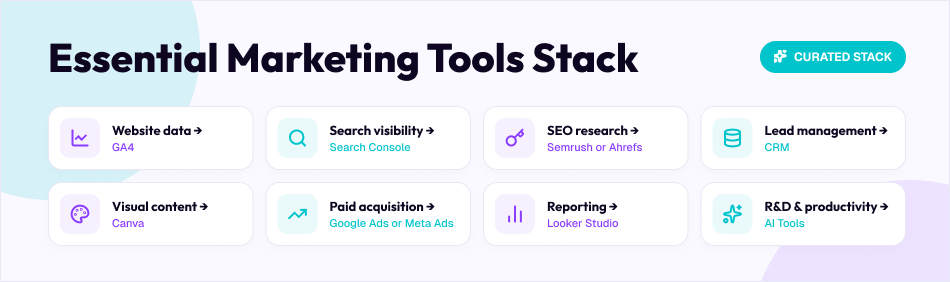
Start with measurement.
You need to know what is happening before you can improve it.
Then add tools according to the next problem.
That is already enough for many businesses.
You can add more when there is a genuine need.
The Tool Is Not the Strategy
This is where marketing teams sometimes get distracted.
A new SEO platform will not fix poor content.
A new social media scheduler will not make boring posts interesting.
A new AI writing tool will not automatically make your brand an authority.
And a new advertising dashboard will not turn an unsuitable offer into a good one.
Tools make good processes faster.
They do not replace the thinking behind those processes.
Before adding another subscription, ask a simple question:
What will this tool help us do better?
If you cannot answer that clearly, you probably do not need it yet.
Final Thoughts
Digital marketing tools have become more capable, but the basic job of marketing has not changed.
You still need to understand your audience.
You still need a useful offer.
You still need good content.
You still need to know where customers are coming from.
And you still need to measure whether your work is producing a business result.
The tools simply make parts of that work faster and easier.
In 2026, AI is becoming a much bigger part of that picture. Google is adding AI into advertising, analytics and measurement, while marketers are using AI tools for research, content and everyday productivity.
But more automation does not mean marketers can stop thinking.
If anything, it makes good judgement more valuable.
Choose a few tools that fit your business, learn them properly, connect the data where possible, and use the information to make better decisions.